
What are some recommended basic video equipment for small YouTube channels?
Essential Gear to Start Your YouTube Journey Without Breaking the Bank
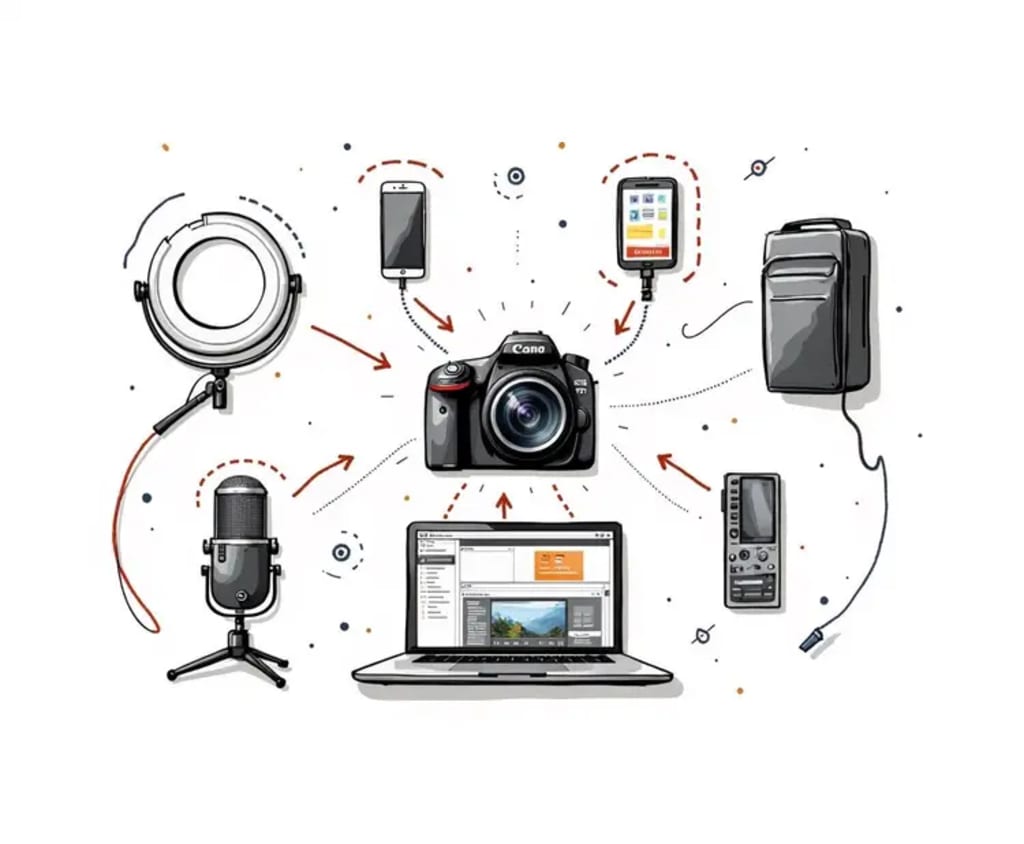
Starting a YouTube channel is an exciting adventure, but one of the biggest hurdles is knowing where to begin when it comes to equipment. You don’t need to break the bank to create high-quality content; the key is selecting gear that meets your needs and fits within your budget. As a seasoned YouTuber, I’m here to share some basic video equipment recommendations that will help your small YouTube channel shine.
1. Camera: Quality Without the Price Tag
While professional cameras can be pricey, there are great budget-friendly options that can help you get started.
Smartphone Camera
Many modern smartphones have cameras that are more than capable of shooting good quality video. The key is ensuring good lighting and stability when shooting. You can also download video editing apps to enhance your footage.
Webcam
If you're planning to do vlogs or sit-down videos, a simple webcam like the Logitech C920 can provide clear and sharp image quality at an affordable price.
DSLR/Mirrorless Camera (optional)
If you want a step up from your smartphone, consider an entry-level DSLR or mirrorless camera, such as the Canon EOS M50 or Sony Alpha a6100. These cameras offer excellent video quality and allow for more control over your shots, but they come at a higher price point.
2. Microphone: Clear Audio is Key
Audio quality is just as important as video quality, and poor sound can quickly turn viewers away. Investing in a good microphone doesn’t have to be expensive.
Lavalier Microphone
If you’re recording on the go, a lapel mic like the Rode SmartLav+ is a great option. It connects directly to your phone and ensures clear audio without picking up too much background noise.
USB Condenser Microphone
For stationary setups, USB microphones such as the Blue Yeti or Audio-Technica AT2020 are popular choices. They provide excellent audio quality and are easy to use with your computer.
Shotgun Microphone
If you're using a camera or smartphone, consider a shotgun mic like the Rode VideoMic or Movo VXR10. These capture sound from the front, minimizing background noise and offering more directional audio.
3. Lighting: Good Lighting Makes All the Difference
Lighting is a crucial factor in achieving a professional look. Even the most expensive camera can produce poor results without proper lighting.
Ring Light
A ring light is an affordable and popular option for creating even, flattering lighting for your face, especially in makeup tutorials, vlogs, or talking head videos. The Neewer Ring Light Kit is a top pick for beginners.
Softbox Lights
If you’re looking for a more professional lighting setup, softbox lights are great for diffusing light and creating a soft, natural look. Brands like Fovitec offer affordable softbox kits.
LED Panels
For versatility, LED panels like Neewer 660 LED are a solid choice. They are adjustable, energy-efficient, and can be used both for key lighting and background lighting.
4. Tripod: Steady Shots Are Essential
Stabilizing your camera is essential for smooth, professional-looking videos. A sturdy tripod is an investment that will pay off in the long run.
Basic Tripod
The AmazonBasics Tripod is a budget-friendly option that works well for most setups. It’s adjustable and can hold a smartphone or DSLR.
Flexible Tripod
If you're shooting from different angles or need portability, the Joby GorillaPod is an excellent choice. It’s bendable, so you can wrap it around objects, giving you more creative flexibility in your shoots.
Editing Software: Post-Production Magic
Even with the right equipment, the magic happens in the editing room. While many advanced editing programs can be pricey, there are free and affordable options that are perfect for beginners.
DaVinci Resolve
This free software is packed with professional-grade editing tools for both video and audio. It's perfect for those looking to edit with a bit more control.
iMovie
For Mac users, iMovie is an excellent and free starting point. It's simple to use, and you can create clean, polished videos without a steep learning curve.
Adobe Premiere Pro
If you're ready to level up your editing, Premiere Pro offers a ton of flexibility, but it comes with a subscription fee. Still, it’s the industry standard and will grow with you as your skills improve.
AI-powered Video enhancer
When your footage isn't perfect, an AI-powered video enhancer like AVCLabs Video Enhancer AI can help. It automatically enhances your video’s resolution, improves color quality, removes noise, and even stabilizes shaky footage. Whether you're working with low-quality footage or want to give your video a professional polish, AI-powered enhancement tools can make your editing process much faster and more efficient.
6. External Storage: Don’t Run Out of Space
As your channel grows, so does the need for storage. Video files take up a lot of space, so investing in an external hard drive or cloud storage will save you headaches down the line.
External Hard Drive
A reliable hard drive like the Seagate Backup Plus will provide you with plenty of storage for all your footage.
Cloud Storage
Cloud options such as Google Drive or Dropbox offer secure, accessible storage that makes file sharing easier, especially if you’re collaborating with others.
Bonus Tips for Small YouTubers
Practice makes perfect. Don’t be afraid to experiment with your gear and lighting to find what works best for you. The more you shoot, the more you'll learn about your setup.
Don’t over-invest early. While it's tempting to get all the high-end equipment, start with the basics and upgrade as your channel grows.
Use natural light when possible. If you’re working with a limited budget, try shooting during the day near windows to take advantage of natural light. It’s free and can create beautiful, soft lighting.
Conclusion
Starting a YouTube channel doesn’t have to cost a fortune. By selecting the right equipment and optimizing what you already have, you can create great content that resonates with your audience. Remember, the most important thing is to start creating, no matter your gear. As your channel grows, you can always upgrade your setup.
By following these simple equipment recommendations, you'll be well on your way to producing high-quality videos without breaking the bank. Focus on your passion and creativity—your audience will notice!
About the Creator
EveWilliams
Youtuber
Keep reading
More stories from EveWilliams and writers in 01 and other communities.
How to Find Out If an Employee Is Moonlighting
As the gig economy continues to grow and living costs soar, more employees are picking up side jobs — a trend that’s fast becoming a norm rather than an exception. According to recent data, the proportion of U.S. workers holding multiple jobs rose from 6.8% in 1996 to 7.8% in 2018, and nearly half of employees globally report having a “side hustle.” By 2024, the global side-hustle economy was estimated at around US$556.7 billion.
By EveWilliams3 months ago in Journal
If You Write A Book, Don’t Tell Anyone
There are days when I’m grateful Amazon doesn’t tell me specifically who has bought my book and who hasn’t. If they did, I would be heartbroken when I read the list and noticed all the important names in my life were not on my list of customers.
By Ellen Frances6 days ago in Writers



Comments
There are no comments for this story
Be the first to respond and start the conversation.