
How to Build Wholesale Pricing on Shopify Using Dynamic Rules
Create flexible wholesale pricing rules so the right customers always see the right prices.
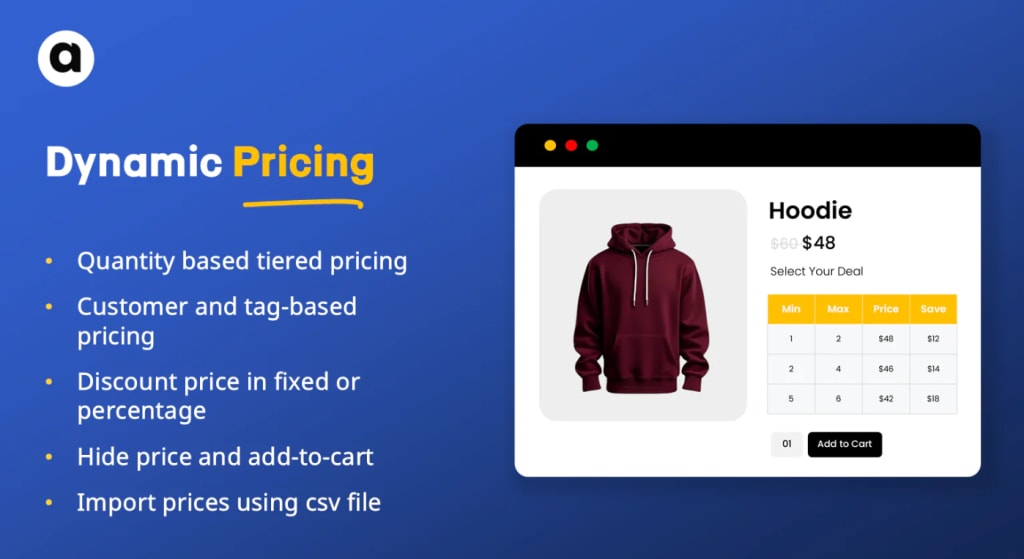
If you run a Shopify store that serves both everyday shoppers and wholesale buyers, you already know how tricky pricing can get. Retail customers expect standard prices, while wholesalers expect special rates and volume discounts. Managing all of this manually can quickly turn into a headache
That’s where dynamic pricing rules come in. They help you automate wholesale pricing so the right customers always see the right prices without extra work on your end.
Let’s walk through how you can build wholesale pricing on Shopify using dynamic rules in a simple, practical way.
What Does Wholesale Pricing Mean on Shopify?
Wholesale pricing means offering discounted product prices to specific customers such as resellers, distributors, or bulk buyers. Instead of giving everyone the same discount, wholesale pricing focuses on who the customer is and how much they’re buying.
For example, a wholesaler might receive 25% off regular prices, while retail shoppers continue to see standard pricing. Dynamic rules make this possible automatically.
Why Use Dynamic Rules for Wholesale Pricing?
Dynamic pricing rules let you control pricing based on conditions you define. Rather than updating prices by hand, everything happens automatically in the background.
Here’s why store owners love this approach:
- Wholesalers get their special pricing instantly
- Retail prices stay untouched
- Discounts adjust based on quantity
- Less manual work for your team
It’s especially helpful if you operate a hybrid store with both B2B and B2C customers.
Step 1: Decide Who Gets Wholesale Pricing
First, you’ll need a way to identify your wholesale customers. The easiest method is by using customer tags.
You can create tags such as:
- wholesaler
- b2b
- distributor
- vip
Once a customer is tagged, you can use that tag to trigger special pricing rules.
Step 2: Choose Your Wholesale Discount Strategy
Next, think about what kind of discounts you want to offer. Some common options include:
- A flat percentage off (like 20%)
- A fixed amount off each product
- Tiered discounts based on order quantity
For example:
- Buy 10–49 items → 15% off
- Buy 50–99 items → 25% off
- Buy 100+ items → 35% off
This approach encourages larger orders while still protecting your margins.
Step 3: Set Up Dynamic Pricing Rules
Using a Shopify bulk discount pricing solution app, you can now create rules that connect customer tags with discounts and quantities.
A simple rule could be:
“If the customer tag is ‘wholesaler’ and the quantity is 20 or more, apply 25% discount.”
You can create multiple rules for different products, collections, or customer groups. Once set, the system applies them automatically.
Step 4: Hide Prices from Non-Wholesale Customers
To avoid confusion, many store owners choose to hide wholesale prices from regular visitors. You can:
- Hide prices for guest users
- Hide the add-to-cart button for non-wholesale customers
- Show pricing only after login
This keeps your storefront clean and ensures only approved customers see wholesale rates.
Step 5: Test Everything Before Launch
Before going live, test your setup using different customer accounts.
Make sure:
- Wholesalers see their discounts
- Retail customers see regular prices
- Quantity-based rules work correctly
A quick test run can save you from costly mistakes later.
Final Thoughts
Wholesale pricing doesn’t have to be complicated. With the Shopify tiered discounts app, you can automate the entire process and confidently serve both retail and wholesale customers from one Shopify store.
Once your rules are in place, pricing takes care of itself—so you can focus on growing your business instead of managing spreadsheets.
About the Creator
Bruce Lee and The God of War: Kuan Ti
It starts with love.. The Power to the God Of War and Wealth Walk into a Chinese restaurant (even in Oklahoma, USA), a Chinese police station, a kung fu martial arts studio or even a Chinese temple and you often see a red faced warrior holding a heavy quan-do (spear like weapon).
By SAMURAI SAM AND WILD DRAGONS30 days ago in Chapters
Puss's Boots - Chapter 1
Orlando was barely nineteen when he suddenly found himself the head of his house. He was still more a boy than a man, but, now, he was the sole man left alive in his family. And he had a sister – his youngest sister and twin – who needed him to provide for her. Except that they had nothing; all that they owned had been destroyed in the fire that had claimed the lives of their parents and other siblings. So now Orlando and Dione, the last remaining members of their once large and happy family, sat on what was left of their front steps and tried to determine their next move.
By Dionearia Red7 days ago in Chapters
The Devil's Triangle
The sails ruffled in the breeze as we cruised along. The Sea Breeze was a mid-size catamaran that sailed out of Royal Naval Dockyard in Bermuda. We had booked this trip weeks in advance and were now looking at our Captain, Spike and two boat hands. Paddy and Wilson seemed like nice guys, joking around with the passengers and telling us some stories about Bermuda that only locals would know. Their island accents sounded almost British but they were pleasant to listen to.
By Barbara Gode Wiles3 days ago in Fiction




Comments
There are no comments for this story
Be the first to respond and start the conversation.