
Introduction to Computer Hardware for Students - Easy Guide
Learn computer hardware and the main parts of computer. A simple guide for students to understand input, output, processing, and storage devices.

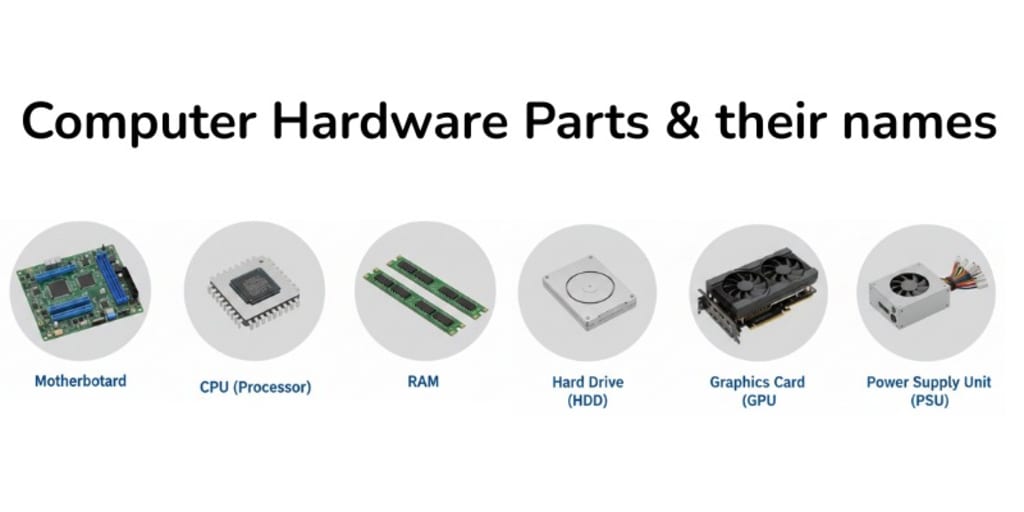
Computers are very important in our daily lives. We use computers at school and at home to study, write, watch videos, play games, and communicate with others. But a computer is not just a screen. It is made of many physical parts. These physical parts are called computer hardware.
This article is written in very simple English for students and beginners. By reading this guide, you will clearly understand what computer hardware is and why it is important.
What is Computer Hardware?
Computer hardware means all the parts of a computer that you can see and touch. These parts work together to make the computer work properly.
Some common examples of hardware are:
- Keyboard
- Mouse
- Monitor
- CPU
- Printer
- Speakers
Without hardware, a computer cannot do any work.
Why is Computer Hardware Important?
Computer hardware is important because it helps the computer:
- It allows us to enter data into the computer.
- It helps the computer process information.
- It shows the results on the screen.
- It stores data safely.
Each hardware part has its own job, and all parts work together like a team.
Main Types of Computer Hardware
Computer hardware is usually divided into four main types. Let’s understand them one by one.
1. Input Devices
Input devices are used to enter data and instructions into the computer. These devices help us communicate with the computer.
Common input devices include:
- Keyboard (to type)
- Mouse (to click and select)
- Scanner (to scan pictures and documents)
- Microphone (to record sound)
- Webcam (to capture images and video)
2. Processing Devices
Processing devices help the computer think and work. These parts control all the activities of the computer.
Common processing devices include:
- CPU (Central Processing Unit): the brain of the computer
- Motherboard: connects all hardware parts together
- The CPU processes data and gives instructions to other parts.
3. Output Devices
Output devices show the results of the computer’s work. These devices help us see, hear, or print the output.
Common output devices include:
- Monitor (to see text and images)
- Printer (to print on paper)
- Speakers (to hear sound)
- Projector (to show on a big screen)
4. Storage Devices
Storage devices are used to save data and information for future use. These devices help keep our files safe.
Common storage devices include:
- Hard disk
- USB flash drive
- Memory card
- CD/DVD
Storage devices can store documents, pictures, videos, and software.
Main Parts of a Computer
Every student should know the basic parts of a computer because they help the computer work properly. The main parts include:
- Monitor
- CPU
- Keyboard
- Mouse
- Storage devices
These parts are found in almost every computer system. You can learn more by visiting this detailed guide about the parts of computer.
Benefits of Learning Computer Hardware
Learning about computer hardware helps students:
- Use computers correctly
- Understand how a computer works
- Fix small problems
- Choose the right devices
- Improve computer skills
This knowledge is very useful for school, future studies, and daily life.
Conclusion
Computer hardware is the backbone of every computer. Without hardware, a computer cannot work. By learning about the different types of hardware and the main parts of a computer, students can build a strong foundation in computer knowledge. This will help them become confident and smart computer users.
Frequently Asked Questions
5. What are output devices?
Output devices show the results of the computer’s work. Examples are monitor, printer, and speakers. They help us see or hear the results.
6. What are storage devices?
Storage devices are used to save data and files for future use. Examples are hard disks, USB drives, and memory cards. They keep files, videos, and software safe.
8. Can a computer work without hardware?
No, a computer cannot work without hardware. Hardware is needed for every task. Software alone cannot run without hardware.
9. Why should students learn about hardware?
Students should learn about hardware to use computers correctly. It also helps them fix small problems and understand how computers work. This knowledge improves their computer skills.
About the Creator
Mum Says University “Failed” Son Who Took His Own Life After Grade Error
The day the email arrived was supposed to be a turning point. For months, the family had been waiting for it the final confirmation that years of late nights, student loans, and quiet sacrifice had been worth it. Instead, the message contained a mistake that would unravel a young man’s confidence and, according to his mother, expose a system that failed him when he needed it most.
By Omoogun oluwaseun mercy6 days ago in Education




Comments
There are no comments for this story
Be the first to respond and start the conversation.