
What is CDE in construction? A comprehensive guide
What is the Common Data Environment (CDE)?
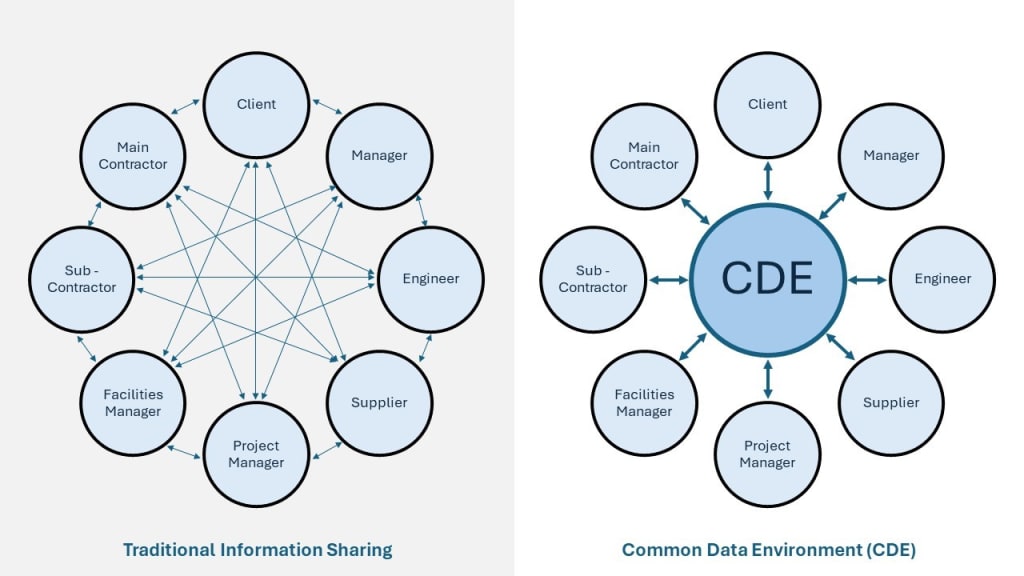
Three years ago, I sat in a meeting room in Ho Chi Minh City while a contractor and an architect screamed at each other. The contractor had built from an outdated drawing. The architect insisted the updated version was "somewhere in the email chain." It took our team eleven days to sort through the mess. The rework cost $2.1 million.
That project changed how I think about construction data. Not because the technology was bad—but because there was no single place where everyone could access the truth.
The construction industry loses $177 billion in labor costs every year. Roughly 96% of captured data goes unused, and 30% disappears by the time the project wraps up. Poor management accounts for 52% of global rework. Professionals waste 13% of their time just hunting for the right files.
All of this points to one missing piece: a Common Data Environment.
What is a common data environment?
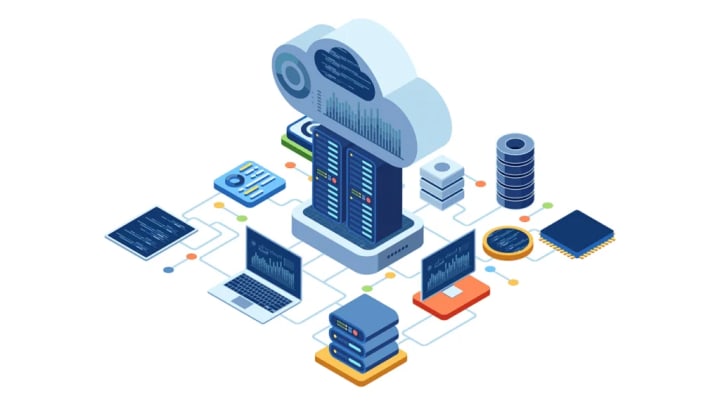
A Common Data Environment—or CDE—is a centralized digital hub where your project team collects, manages, and distributes every piece of project information. Think of it as the one room where everybody puts their work, from architectural drawings to signed contracts.
The BIM Wiki puts it plainly: "the single source of information used to collect, manage and disseminate documentation, the graphical model and non-graphical data for the whole project team."
British developers introduced this concept within the UK BIM Level 2 standards. Back then, it was about managing complex 3D data. Today? A modern CDE holds everything—contracts, schedules, point cloud files, meeting notes, and more.
I've worked with teams who treated their CDE like a glorified Dropbox folder. That's a mistake. A CDE is not just storage. It's the operating system of your project.
What is the difference between a CDE and a Document Management System (DMS)?
I get this question a lot. A Document Management System (DMS) handles static files—upload, store, retrieve. It works fine for a law firm. Not for a construction project where 40 people need to collaborate on a single BIM model in real time.
A CDE goes further. It supports active collaboration, handles complex BIM data, and maintains strict version control. When an engineer changes a beam size in the structural model, the MEP team sees it immediately. That kind of live coordination doesn't happen in a DMS.
What does ISO 19650 require?
ISO 19650 is the international standard governing how construction teams manage information. Section 3.3.15 defines the CDE as "an agreed source for collecting and managing data through a controlled process."
Here's what that means in practice. Every information container—whether it's a Revit file, a PDF spec sheet, or a meeting record—needs a unique identifier. Your team must follow standard naming conventions, apply suitability status codes, and track every revision.
The audit trail matters most. I've seen disputes over who approved a design change drag on for months. When your CDE logs every action with timestamps and user IDs, those arguments end fast.
Why is a CDE important?
Construction projects often face chaotic data management, but we identified five reasons why a common data environment stabilizes your workflow:
- Enhances collaboration: Centralized systems allow project data to flow freely between architects and engineers. Teams coordinate better because information updates instantly across the entire platform.
- Creates a single source of truth: A reliable hub gives members access to real-time point cloud data and plan changes. Managers make sharper decisions when they trust the accuracy of the files.
- Improves efficiency and quality: Automation reduces the need for manual data entry and minimizes input errors. Firms work faster because the information remains accessible to everyone who needs it.
- Lowers risk: Transparency provides clear insight into the project landscape and potential clashes. Business owners gain predictability and control over the budget as the job progresses.
- Strengthens security: Administrators maintain strict control over sensitive model data and proprietary information. IT professionals protect the project files against unauthorized access or potential cyber threats.
What types of data can be stored in a CDE?
Construction projects generate a staggering volume of files. Over the years, I've found that organizing them into six categories keeps things manageable:
CAD drawings and 3D models are the backbone. These include everything from 2D floor plans to detailed Revit assemblies. Your design team uploads them here so everyone reviews the same version during each phase.
Specifications and reports capture the technical requirements—material grades, load calculations, soil test results. Engineers reference these constantly, so burying them in email attachments is a recipe for mistakes.
Contracts and legal documentation need a secure, auditable home. When a dispute arises eighteen months after signing, you want to pull up the original agreement in thirty seconds, not thirty days.
Communication records are easy to overlook. But archived emails, meeting minutes, and formal RFIs create a paper trail that protects everyone. I've watched a $400,000 claim get settled in a single afternoon because the meeting notes in the CDE proved exactly when a change order was discussed.
BIM models and asset data go beyond simple geometry. These files contain intelligent object properties—material types, manufacturer details, maintenance schedules. They're what turn a 3D model into a true digital twin.
Photos and videos from site surveys provide reality capture data. Comparing drone footage against the digital model is one of the fastest ways to spot construction deviations early.
What are the key features of a Common Data Environment?
Not all platforms deliver the same experience. After testing multiple systems over the past five years, these are the features that actually matter:
Version control should be automatic. If someone has to manually label files "v2_final_FINAL," the system has already failed. The platform tracks every save, and the team always works on the current version.
Access permissions need granularity. On a hospital project I worked on, the mechanical subcontractor needed access to the MEP model but absolutely not to the structural design files. Folder-level permissions handled that cleanly.
Audit trails record who did what, when, and to which file. This sounds boring until you need to prove that a specific drawing was approved before concrete was poured.
Built-in collaboration tools reduce the need to jump between platforms. Commenting directly on a model element beats sending a screenshot over email and hoping the right person sees it.
Data structuring through naming conventions is unglamorous but critical. On large scan-to-BIM projects, a single laser scan can produce hundreds of files. Without consistent naming, retrieval turns into guesswork.
Cloud storage means your project manager in London and your site foreman in Da Nang can review the same progress model before the morning coffee gets cold.
Who contributes to the CDE?
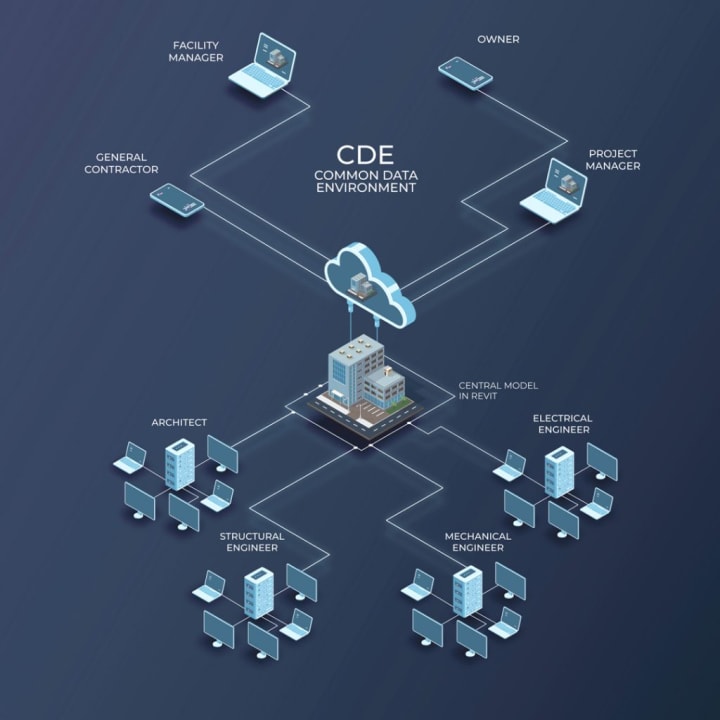
The CDE gathers intelligence from the wider project team because it draws on the specific skills of diverse disciplines. Architectural designers and landscape planners work alongside structural engineers and MEP service providers to populate the model.
These contributors add their deliverables to the system as data drops at specific intervals. The project manager usually defines this schedule in the Employer's Information Requirements to maintain consistency.
What form does the CDE take?
Your team decides the specific form of the CDE based on the project constraints. PAS 1192 2 states that the environment can function effectively as a project server, an extranet, or a simple file-based retrieval system.
We identified two specific elements that managers must establish early to support all contributing parties:
File Naming Conventions: You should use a standard protocol, such as BS 1192:2007, to keep the scan data and models organized.
Security: You must determine information security pre-requisites by referencing guides on security-minded BIM approaches.
We often divide the CDE into distinct environments to manage the data flow effectively.
Purpose: These areas serve the supply chain while allowing managers to collate deliverables for the Employer's Information Requirements.
Controls: Administrators enforce distinct permissions and protocols across these divisions to maintain data integrity.
A CDE may operate as a server, extranet, or file system using standard naming and security protocols
Who is responsible for the CDE?
The CIC BIM Protocol assigns ownership of the environment to an appointed Information Manager. You must distinguish this position from the BIM coordinator role, as the focus shifts to data governance. The Information Manager keeps the shared files synchronized and coherent throughout the modeling process. Senior team members usually accept this coordination duty to maintain strict standards.
Who owns the information in the CDE, and who hosts the CDE?
Contributors retain specific ownership of the information they store within the environment. Individual teams keep their models separate because these files eventually combine to produce the federated model.
We rely on two specific licensing structures rather than transferring ownership immediately during the project:
Team to Client: Team members license their contributions to the client for the specific purposes outlined in the Employer's Information Requirements.
Client to Team: The client licenses the aggregated models back to the CDE so other members can use the data.
Ownership status often shifts as the project progresses and the team makes new decisions. Sub-contractors might swap out designer specifications for manufacturer objects, so the Information Manager must track these updates.
How Does a Common Data Environment Support BIM Workflows?
Professionals apply the BIM methodology to generate accurate digital twins that span the full project lifecycle. A secure CDE supports this workflow by uniting different teams through shared technology and standard processes. Construction managers often reduce rework costs by resolving design conflicts in the virtual model before construction begins. The platform records these updates and creates a transparent history that helps engineers maintain efficiency throughout the job.
You now understand the essentials of what is cde in construction because we covered the features, ownership, and practical workflows. A solid data environment stops the information chaos that usually plagues complex building projects.
About the Creator
ViBIM - BIM Modeling Service
Founded in 2014, 3D Revit BIM Modeling outsourcing services at ViBIM based in Vietnam, dedicated to helping architects, engineers, and contractors transform complex laser scan data into precise, high-quality Revit models.
Keep reading
More stories from ViBIM - BIM Modeling Service and writers in FYI and other communities.
Point Cloud vs. BIM: What Is the Difference?
A Point Cloud is a comprehensive collection of millions of individual 3D data points captured via laser scanning, representing the exact physical geometry and surface of a structure. In contrast, Building Information Modeling (BIM) is an intelligent, data-rich process that uses parametric objects to create digital representations of building components. The relationship between these two is foundational: Point Clouds provide the precise as-built data that serves as the raw material for creating high-fidelity BIM models, bridging the gap between the physical site and the digital design environment.
By ViBIM - BIM Modeling Service2 months ago in FYI



Comments
There are no comments for this story
Be the first to respond and start the conversation.