
How to Get Your Permanent Driving License: A Simple Guide
What is a Permanent Driving License? Documents You Need to Apply Steps to Apply for a Permanent Driving License Online Visiting the RTO: What to Expect Final Processing and Receiving Your License Why Apply for Your License Online? Check Your Driving License Status Anytime Frequently Asked Questions Tips for a Smooth Application Process Stay Safe: Driving Responsibly After Getting Your License

Getting your permanent driving license is an exciting milestone, whether you're a new driver or just renewing your license. It allows you to drive legally on public roads and highways without restrictions, but before you can get it, there are some steps you need to follow. This guide will walk you through everything you need to know, from the required documents to the application process and beyond.
Whether you plan to apply online or offline, we’ll make it simple for you. By the end of this guide, you’ll know exactly what you need to do to get your permanent driving license.
What is a Permanent Driving License?
A permanent driving license is a document that proves you can legally drive a vehicle on public roads. You can apply for it once you’ve completed all the necessary requirements, including passing driving tests and following traffic rules. A permanent driving license is valid for a specific number of years, after which you’ll need to renew it.
With a permanent driving license, you’re allowed to drive certain types of vehicles like cars, motorcycles, or trucks. It’s an official recognition that you have the skills to drive safely and responsibly.
Steps to Apply for Your Permanent Driving License Online
One of the most convenient ways to apply for your permanent driving license is online. It saves time and can often be done from the comfort of your own home. Here’s how you can do it:
1. Gather the Required Documents
Before applying for your driving license, it’s important to have all the necessary documents in hand. Here’s what you need to prepare:
Proof of Identity: You can use your Aadhaar card, passport, or voter ID.
Proof of Address: This could be a utility bill, rental agreement, or other official document showing your address.
Age Proof: A birth certificate, school leaving certificate, or any other document confirming your age.
Passport-sized Photographs: Usually, you’ll need a few passport-sized photos for the application.
Learner’s License: You must already have a valid learner’s license before you apply for a permanent one.
Once you have all these documents ready, you’re good to go!
2. Apply Online
Here are the steps to apply for your permanent driving license online:
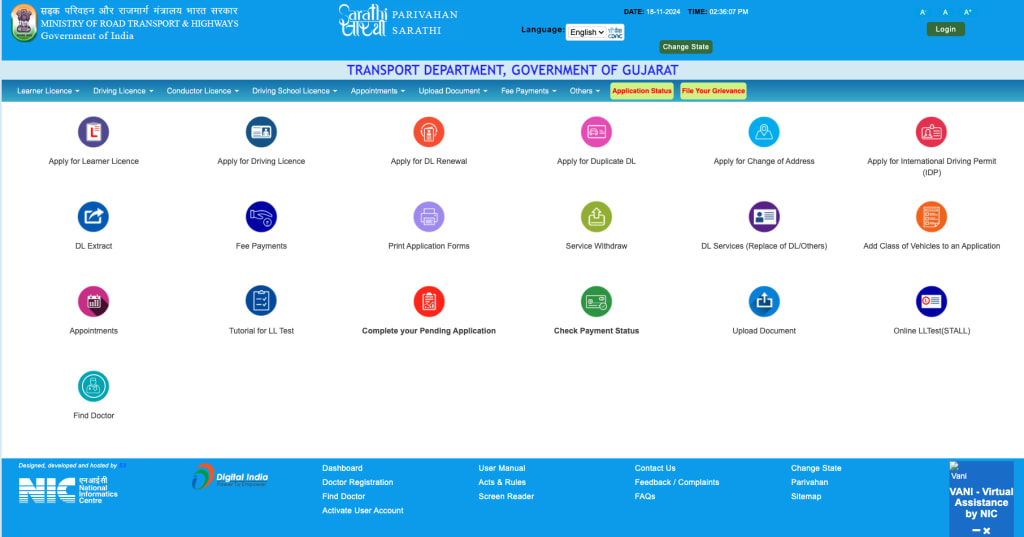
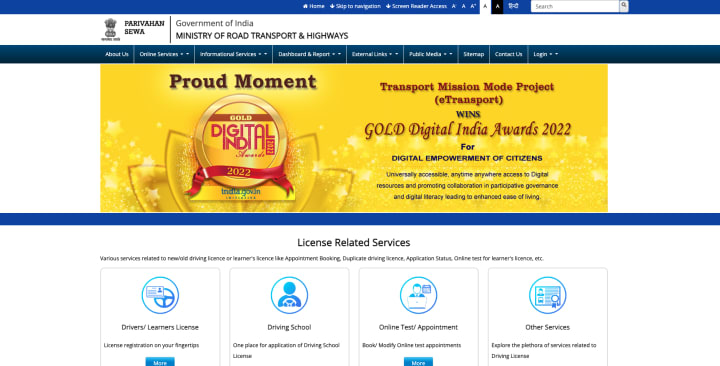
- Visit the Parivahan website (The official site for driving license applications in India).
- Choose your state from the dropdown menu.
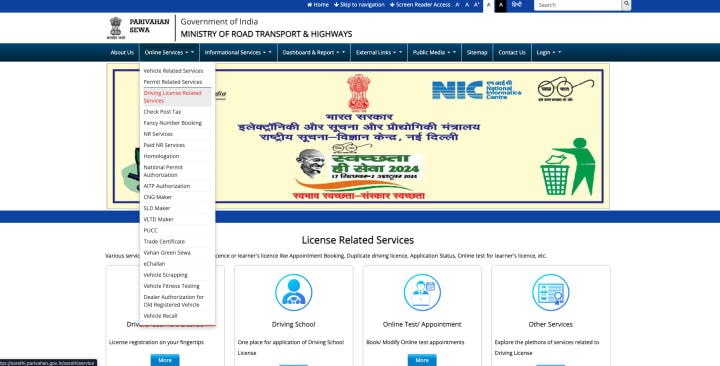
- In the “Driving License” section, select “New Driving License”.
- Enter your Learning License Number and Date of Birth to proceed.
- Complete the application form and make sure all your details are correct.
- Pay the required fees online.
After completing the form, click Next and proceed with the application.
Once the online form is filled, it’s time to schedule a visit to the Regional Transport Office (RTO) in your area.
3. Visit the RTO
After completing your online application, you’ll need to visit the Regional Transport Office (RTO) on the scheduled date. Make sure to carry the following documents:
- The original documents (Aadhaar card, passport, proof of address, etc.)
- Photocopies of the documents for verification purposes.
- Fee receipt that you got when you paid the application fee online.
If you’re required to take a driving test, you’ll need to be ready for it at the RTO.
The RTO staff will verify your documents, and if everything is in order, you might be asked to take a driving test. The test ensures you have the skills to drive safely.
4. Final Processing
Once you’ve completed all the steps and passed any required tests, your application will be processed by the RTO. If everything is fine, they will issue your permanent driving license. This will be sent to your registered address by post. It may take a few days to arrive, so be patient.
Once you receive your driving license, you're ready to drive on public roads. Keep it with you every time you're behind the wheel!
Additional Information About Your Permanent Driving License
Why Apply Online?
Applying for your driving license online is much easier and faster than applying offline. Some of the benefits of applying online include:
Convenience: You don’t have to wait in long queues at the RTO.
Faster Processing: Your details are already entered online, speeding up the process.
Track Your Application: You can track the progress of your application easily through the website.
Double-Check Eligibility
Before you apply, make sure you meet the eligibility requirements for your state. In most states, you must be at least 18 years old to apply for a car driving license, and you must have held a learner’s license for at least 30 days (usually for cars).
Each state might have slightly different requirements, so it’s important to check the specific rules for your area before starting the application.
Keep Your Documents Handy
During the RTO visit, it’s essential to carry all your original documents, as well as photocopies. If you miss any document, you might face delays in the application process.
Track Your Application Status
Once you’ve submitted your application, you can track the status online through the Parivahan website. This allows you to stay updated on the progress of your application, so you know when your driving license will be issued.
How to Check Your Driving License Status Online
Here’s how you can easily check the status of your driving license through the official Parivahan website:
- Visit the official Parivahan website.
- Under the Online Services section, select Driving License Related Services.
- Choose your state from the dropdown menu.
- Click on Check Driving License Status.
- Enter your driving license number and your date of birth.
- Complete the captcha verification.
- Click Submit to view your status.
By following these steps, you’ll be able to see where your application stands and when you can expect to receive your license.
FAQs
What Documents Do I Need to Apply for a Permanent Driving License?
- Proof of Identity: Aadhaar card, passport, or voter ID.
- Proof of Address: Utility bill, rental agreement, etc.
- Proof of Age: Birth certificate, school leaving certificate.
- Photographs: Passport-sized photos.
- Learner’s License: Must have a valid learner's license.
How Can I Apply for a Permanent Driving License Online?
To apply for your permanent driving license online, visit your state’s transport website, fill out the application form, upload the required documents, pay the application fee, and schedule your driving test.
How Will I Receive My Permanent Driving License?
Once your application is processed, your driving license will be sent to your registered address by post. It may take some time, so be patient.
How Can I Check the Status of My Driving License Online?
You can check the status of your driving license by visiting the Parivahan website. Just enter your license number, date of birth, and complete the captcha to view your application status.
Final Thoughts
Getting your permanent driving license is an important step to driving legally on the road. By following the steps mentioned in this guide, you’ll be able to apply easily and efficiently, whether you choose to apply online or offline. Always make sure you meet the eligibility requirements, have your documents ready, and follow the instructions carefully.
After receiving your permanent driving license, remember to always drive safely and responsibly. Obey traffic rules, stay alert, and take care of your license to ensure that your driving experience remains smooth and legal.
Check your driving license details online. If you need any more help with your driving license application, feel free to check the VehicleInfo website for additional resources and updates.
About the Creator
Yankit Gayakvad
With 4 years of experience in digital marketing, I specialize in SEO, SMO, SEM, and content strategy. I use data-driven techniques to enhance online visibility, boost engagement, and drive measurable growth for brands.
Keep reading
More stories from Yankit Gayakvad and writers in Wheel and other communities.
Check Vehicle Challan Status & Search Challan Details Online
Are you wondering how to stay updated on your vehicle challan status or make e-challan payments without hassle? In today's fast-paced world, managing your traffic challan and ensuring compliance is easier than ever with digital platforms. This blog will guide you through the process of checking and paying challan online, ensuring a smooth experience every time.
By Yankit Gayakvadabout a year ago in Wheel
5 Aftermarket Parts that Most Commonly Cause Fitment Issues in Japanese Cars
Aftermarket parts are a major reason drivers choose Japanese cars. The Japanese Domestic Market (JDM) gives car owners many ways to customize their vehicles, whether it’s to boost performance or enhance visual appeal. Brands like Subaru, Honda, Nissan, Toyota, and Mitsubishi benefit from extensive aftermarket support, providing a range of modification options.
By William Powell6 days ago in Wheel
How to Winterize Your ATV: Axle Inspection & Replacement
As cold weather hits, it’s time to start thinking about preparing your ATV for the winter months ahead. Properly preparing your equipment will ensure you’re ready to ride by the time spring rolls around and prevent potentially costly damage that could occur. The following tips will help you get your ATV or UTV fully winterized and prepared to ride out the weeks ahead.
By Jordan McDowell6 days ago in Wheel



Comments
There are no comments for this story
Be the first to respond and start the conversation.