
How to center a div?
How to Center a Div in CSS 😅 (It’s Easier Than You Think!)


Hi there, web enthusiast! Ever feel that sometimes you want to center a div inside your CSS? You are not alone. This pretty simple act at times can be frustratingly the most hateful thing ever when designing a web. But neither should you be scared, nor does it have to be that hard-I’m here to walk you through how I do it with ease. 💪
🎯 Table of Contents
- Why Centering a Div Matters
- Flexbox: The Modern Solution
- Grid Magic for Centering
- Absolute Positioning, But Make It Centered
- Margin Auto for Horizontal Centering
- Inline-Block for Inline Elements
- Final Thoughts & Tips
- Why Centering a Div Matters 🤔
Centering a div can be a great way to beautify your web pages. Well-centered content just pops on the screen, polished and professional. Be it for a hero section, a modal, or a button, knowing how to center a div saves your life! Not literally, but close enough! 😂.
Now let’s jump into some quick and effective ways to center your divs!
1. Flexbox: The Modern Solution 🚀
Flexbox is your best friend when it comes to centering both horizontally and vertically. It’s easy to use and works perfectly for most situations.
.container {
display: flex;
justify-content: center; /* Center horizontally */
align-items: center; /* Center vertically */
}
<div class="container">
<div class="centered-div">🎉 Centered Content 🎉</div>
</div>
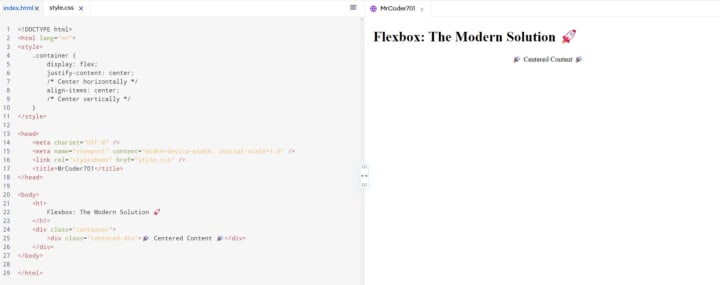
Why I Love It : Flexbox gives you more control over alignment. Plus, it’s super readable, making it clear what’s happening. Just two lines — justify-content and align-items—and your div is perfectly centered! ✨
2. CSS Grid: Another Great Option 🧙♂️
If you’re already using CSS Grid for layout, centering your div becomes even easier:
.container {
display: grid;
place-items: center; /* Centers both horizontally and vertically */
}
<div class="container">
<div class="centered-div">🎯 Centered Content 🎯</div>
</div>
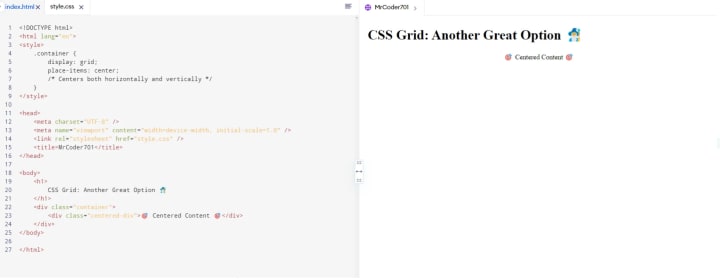
Why It Works Like Magic : CSS Grid allows you to use place-items: center to handle all the centering for you—super clean and powerful. It’s like the wizard of centering divs! 🧙♂️✨
3. Absolute Positioning, But Make It Centered 🎯
Sometimes, you need a little more precision with positioning. Absolute positioning is great for that:
.container {
position: relative; /* Important to set context */
height: 100vh;
}
.centered-div {
position: absolute;
top: 50%; /* Move to middle vertically */
left: 50%; /* Move to middle horizontally */
transform: translate(-50%, -50%); /* Perfectly center by offsetting */
}
<div class="container">
<div class="centered-div">📍 Centered Content 📍</div>
</div>
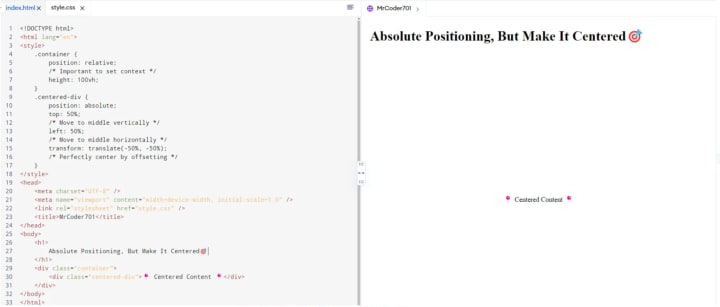
Why It’s Handy : Using transform: translate(-50%, -50%) offsets the div so it's truly centered. Perfect when you need precision, especially for modals or elements that need to float above everything else.
4. Margin Auto for Horizontal Centering 🏎️
Sometimes all you need is horizontal centering, and margin: auto does the job beautifully:
.centered-div {
width: 50%; /* Set a width for centering */
margin: 0 auto; /* Centers horizontally */
}
<div class="centered-div">💎 Centered Content 💎</div>
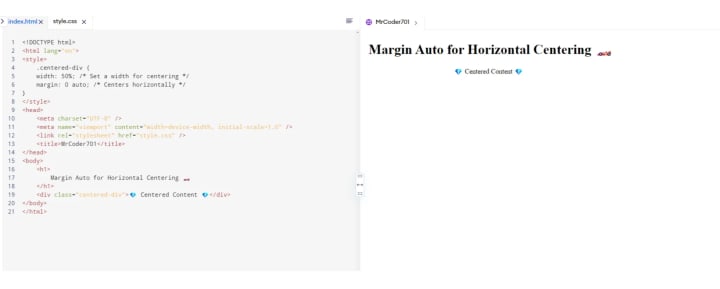
When to Use It : Quick and effective, this method is best when you only need horizontal centering (for example, a fixed-width card or button).
5. Inline-Block Centering for Inline Elements 🎈
If you’re working with inline or inline-block elements, here’s how to center them like a breeze:
.container {
text-align: center; /* Center horizontally */
line-height: 100vh; /* Center vertically */
}
.centered-div {
display: inline-block; /* Make the div inline-block */
vertical-align: middle; /* Center vertically */
line-height: normal; /* Reset line-height for the content */
}
<div class="container">
<div class="centered-div">📦 Centered Content 📦</div>
</div>
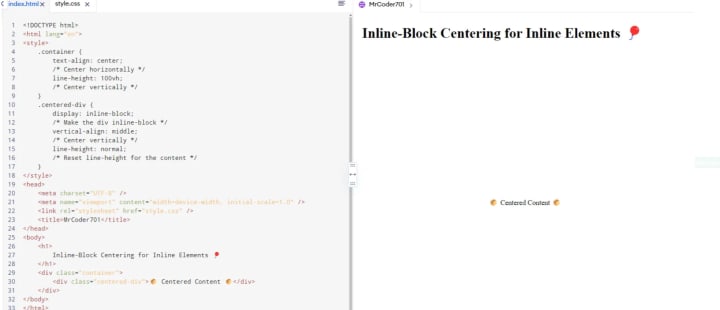
Why This Works : By using inline-block, you make the div behave like an inline element, making it easier to center with text-align. This method works great for centering smaller chunks of content.
Final Thoughts & Tips 📝
Centering a div might have felt impossible in the past, but now you’ve got a whole toolkit to make it happen! 💼 Remember:
- Flexbox is perfect for most situations.
- Grid is great for complex layouts with built-in centering.
- Absolute positioning works best for precise overlays.
- Margin auto is your friend for horizontal centering.
- Inline-block handles those tricky inline elements.
If you ever are confused, just choose one of these, and you can never go wrong. Trust me, you do it a couple of times, centering divs, then, you’re a pro at it! 💯
Happy coding, and keep those divs centred! 🎨🖥️✨
A Note From the Author
Thank you so much for taking the time to read the story. If you found my article helpful and interesting, please share your thoughts in the comment section, and don’t forget to share and clap 😊
📞 Let’s Get in Touch! 📞
- YouTube: mrcoder701
- Instagram: mr_coder_701
- LinkedIn: Gajanan Rajput
- Website: mrcoder701.com
- GitHub: @gajanan0707
- Medium: Gajanan Rajput
About the Creator
Gajanan Rajput
I'm a self-taught programmer and a technical writer.
Keep reading
More stories from Gajanan Rajput and writers in Writers and other communities.
From Reader to Friend of Medium: My Journey to 1K Followers and Beyond
On October 8, 2021, I did something that seemed daring and exciting at the time-publishing my very first article on Medium, titled Custom User in Django. Let me tell you, I had absolutely no idea what I was getting myself into. Fast track to today, that little tech knowledge has over 11,000 views and 6,300 reads. Not bad for a first-timer, right? But wait, there’s more to this story.
By Gajanan Rajputabout a year ago in Writers
To Write A Villanelle
Introduction The villanelle is now my preferred poetic form. My audience and friends tell me how good my villanelle's are but they seem to be scared of the form. While I have written many excellent villanelles none have been awarded a Vocal Top Story, though that may be because I am on Vocal's naughty shelf, they don't see me as a poet or writer.
By Mike Singleton 💜 Mikeydred 8 days ago in Writers




Comments
There are no comments for this story
Be the first to respond and start the conversation.