
DIY Chore Buckets for Kids
Simple chore and reward system for your little ones

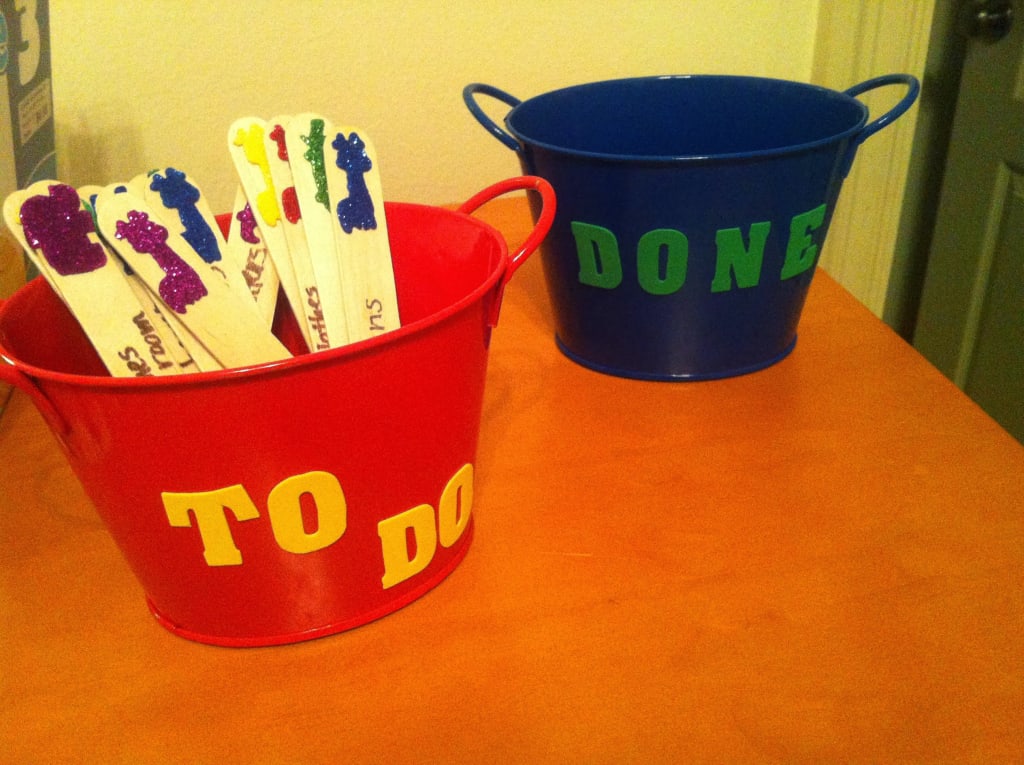
Are you looking for an easy way to get your younger kids to help around the house? Do tasks that will benefit them as well? This article will show you steps to give them responsibility and accountability. And they can be rewarded for it. Your local dollar store will have the supplies that you need to create decorative, interactive chore buckets and a reward system. Perhaps you have some of the supplies at home already.
Supplies
- pack of jumbo craft sticks
- 1 red mini bucket
- 1 blue mini bucket
- pack of foam letter stickers
- pack of self-adhesive foil stars
- pack of glitter character stickers
- clipboard (optional)
- permanent marker
- printer paper

How to create chore buckets
Most younger kids love bright colors, so use as many as you can in this project. Apply foam letter stickers on the red mini bucket to spell out TO DO. Apply foam letter stickers on the blue mini bucket to spell out DONE.

Use the permanent marker to clearly write out a specific chore on a jumbo craft stick starting from the left end. Then apply a colorful glitter character sticker to the right end. Do this on both sides of the craft stick so you don’t have to flip it over to read it. Feel free to make several sticks for the same chore if it can be done multiple times. I don’t consider reading a book to be a chore by any means, but it’s something that I have to “remind” my kiddo to do.
Then put all of the craft sticks in the TO DO bucket with the right end sticking out to showcase the glitter character stickers. Place the TO DO bucket where you think your child will be most attracted to it. For example, in your child's bedroom, laundry room, or common area in your home.
How to implement the chore and reward system
Depending on your child's age, you can allow them to choose which chore sticks to complete from the TO DO bucket or you can instruct them on your preferences. Once a chore is completed, you can have your child tell you that he or she is done to ensure the chore was completed to your satisfaction. If so, then the chore stick can be placed in the DONE bucket. You may want to keep the DONE bucket in a separate area that you can monitor.

You can create a simple reward chart template in Excel or similar platform and print it out as needed. Attach it to a clipboard for best use. Like the DONE bucket, you may want to keep this chart in an area where you can monitor it. In order to make the system most effective, establish a deadline for receiving rewards such as one week or two week increments.
For every chore stick in the DONE bucket, apply 1 foil star to the reward chart during the time frame that you established. At the end of each time frame, write in the total number of stars received. Determine how many stars will garner rewards.
Promptly issue the applicable amount of rewards after each deadline. This reward system can get pricey, particularly if your child learns how to expertly navigate it, so I recommend choosing rewards such as small denomination gift cards, play date, sleepover, small toy, sweet treat, etc.
Tips
- Adjust this process to fit your child's age
- Don't include the "givens" such as toilet flushing, turning off lights not in use
- Create additional chores and rewards to reflect their growth
- If you have more than one child, create multiple buckets and charts
About the Creator
Kimberly H. Smith
Published author, copywriter, and transcription editor. Louisiana native with B.A. in Theatre from LSU. Wife and mother currently in the Detroit area writing a wide range of articles for freelance networks.
Keep reading
More stories from Kimberly H. Smith and writers in Families and other communities.
Momma's Glazed Baked Ham Recipe
My Momma made the best glazed baked ham this side (and the other side) of the Mississippi River. She gave me the recipe a few years ago so I could make it for my family on Thanksgiving. I was surprised at how easy it was to do. I love how she rigged the process to make it her own.
By Kimberly H. Smith6 years ago in Feast
Wait, is it okay not to go home for the Holidays?
Kids these days are choosing to stay home rather than see their parents or their other family members for the holidays. I found it a bit absurd and tried to explain that it is important to bond with family, because you don’t know when you'll see them again, until someone called me out for not having visited my family in over 20 years.
By stephanie borgesa day ago in Families


Comments
There are no comments for this story
Be the first to respond and start the conversation.